fv: Features
fv is a general-purpose FITS file editor (formerly just a
file viewer) able to manipulate virtually all aspects of
a FITS file and perform basic data analysis of its contents.
(Highlighted
items are new to release 2.6.)
- fv runs under most major operating systems: Unix/Linux, Windows,
and, with this release, Mac OS.
- Basic fv functions -- open, display, and plot data -- can be
accessed from simple TCL scripts.
With the XPA package (available separately from
SAO) for unix, fv can be controlled by other programs. On Mac OS,
fv can be controlled with AppleScript.
Sample programs written
using XPA (C, Tcl, and Csh), Tcl, and AppleScript are
included.
- Files can be opened (read-only) across the
internet (http and ftp protocols). FTP sites can be browsed from
the "Open File" dialog box.
- Filename completion eases browsing large directories and typing
long names... type the first few letters of a filename and then
hit TAB.
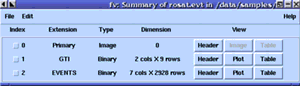
- A summary window lists the
contents and size of all the extensions in the FITS file. Entire
extensions can be copied, cut, and pasted to/from the clipboard
which can be saved to a new FITS file. New,
empty FITS files can be created. Empty extensions of any of the
3 basic types -- image, ASCII table, and binary table -- can be
appended to existing files.
- FITS headers may be displayed in a
scrolling text window. Keywords may be edited, inserted, or deleted,
and an ASCII text listing of the header may be generated.
Checksum keywords can be created or updated when a
file is modified.
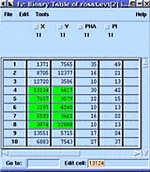
- Selected columns in a FITS table
may be viewed in a scrolling spreadsheet. The values in the
table may be edited, and rows and columns may be inserted or
deleted in the table. Tables can be sorted using multiple keys
and rows with identical keys optionally deleted. Table rows can
be selectively deleted using a boolean expression evaluated for
each row. The contents of a table may be saved to an ASCII text
file.
- Line plots of one or more columns (or
arithmetic expressions involving one or more columns) in a
table may be generated and displayed in the POW widget. Individual columns or
pairs of columns can be used to produce 1D or 2D histograms,
respectively, and plotted in POW.
- A spreadsheet calculator function
allows you to create new columns by performing arithmetic on existing
columns.
- FITS images may be displayed with the usual pan, zoom, and color
table manipulation facilities. Users may choose to use the SAOtng
image display tool (available separately from SAO), or the
internal image display widget called POW
that is supplied with fv. Double clicking
an image displayed by POW will bring up a fv table of the
image data with the clicked pixel highlighted.
- FITS image data also may be displayed as a table, allowing
individual pixels to be edited. Selected rows or columns can be
averaged and their pixels plotted in a line graph.
- An optional "Desktop Manager" allows for management of
the various fv windows.
POW: Features
POW is a general-purpose graphing widget
which can display and manipulate line plots and images.
(Highlighted
items are new to release 2.6.)
- Graphs can be repositioned and resized, and regions of interest
can be zoomed in on. The cursor's position within a graph and,
for images, the pixel's value located there are displayed in a
continuously-updated readout.
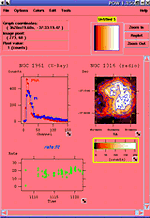
- An image's colortable (i.e. contrast and bias) can be
interactively manipulated. More than
20 different color schemes can be selected.
- Histogram Equalization colormap
intelligently distributes the colormap according to the
distribution of pixel intensities in an image.
- POW supports TrueColor displays and has more "X colormap friendly"
support for PsuedoColor display. See the documentation for
the "-cmap" fv command line switch or the POW "Color" help menu
item for details.
- POW interprets standard FITS World Coordinate System (WCS)
keywords, and optionally displays grid lines. Newer 'CD' style keywords supported in latest
release.
- Text labels can be placed on a graph at a
position fixed either to the graph (eg, a legend) or to the
graph's coordinate system (eg, an object label).
- Font, size, and style of labels can be
independently controlled for graph titles, axis labels, tick
labels, and each text label.
- Once displayed in POW, the contents of graphs can be edited and
multiple graphs can be merged into one. Coordinate information
(labels, pixel sizes, WCS parameters, etc) can be modified as
well.
- Multiple images can be mosaiced within a single graph. The only
restriction is that the images have identical
rotations. (Well-separated WCS images will not be projected
exactly, though.)
- A single intuitive dialog box
controls virtually all aspects of a graph, from
its contents and labels, to the tick mark spacing, to the display
options of its curves, to the colormaps of its images.
- Each curve plotted in a graph can be displayed in a number of
line styles/widths, point shapes/sizes, and colors.
The color of a curve's points and connecting
lines can have different colors. Graphs containing multiple
curves will have different colors assigned to each
curve.
- Log and semi-log graphs can be created from
either logarithmic or regular curve data.
- POW can create, read, write, and graphically manipulate
regions
(boxes, circles, ellipses, polygons, lines, and points). (Data
analysis of regions will be added in a later version.)
- POW can "blink" a set of images or graphs in rapid sequence. A
3D image cube can be animated in this manner.
- POW can create contour maps of
images.
- A standalone tool, POWplot, can be used to display a single image
without going through fv.
See the release notes for details on
the changes from the previous version.
Pages maintained by
Bryan Irby
Send bug reports or feature requests to
ftoolshelp@athena.gsfc.nasa.gov
|

