Things to watch out for with XRISM data processing and analysis
Email the XRISM Science Data Center (SDC) helpdesk with any questions: XRISM-SDC-help@lists.nasa.gov
Latest update 2026-02-17
General
- GEN-6: Update to xaarfgen in HEASoft 6.36 (added 2025-11-21)
- The update to xaarfgen in HEASoft 6.36 to apply newly introduced optical-axis offset parameters in CalDB 12 is problematic and will be revised in the next software release. In the meantime, the XMA team recommends disabling the use of the offset parameters. This can be done either by using CalDB 11 only for running xaarfgen or rslmkrsp, or if only CalDB 12 is being used, resetting the offset keywords to 0.0 in the .expo file that is input to xaarfgen or rslmkrsp. The latter can be done with the following commands, where rslsource.expo is a copy of the Resolve file made by xaexpmap:
fparkey fitsfile=rslsource.expo keyword=OPTAOFFX value=0.0 comm="optical axis X offset reset to 0"
fparkey fitsfile=rslsource.expo keyword=OPTAOFFY value=0.0 comm="optical axis Y offset reset to 0"
The same commands are applied to the Xtend .expo file.
- GEN-5: 'erange' parameter in xaarfgen (added 2025-07-22)
- In versions earlier than HEASoft 6.36, the default value of the 'erange' lower limit of 0.1 keV should not be used as it will result in an erroneous ARF. For GV closed, the value should not be less than 0.5 keV (0.3 keV for GV open). The default was set to 0.5 keV in HEASoft 6.36.
- The function of the 'erange' parameter is not straightforward: the output ARF will not necessarily cover the range that is requested by the parameter because xaarfgen will choose internal energy grid points that are the nearest matches in a particular CalDB table to the values in 'erange'. If the output ARF does not cover the desired energy range, re-run xaarfgen with a wider energy range.
- GEN-4: RA/DEC vs. SKY coordinates (added 2025-04-15)
- Please note that SKY coordinate region files are not the same as RA/DEC region files. SKY specifies the X,Y columns in pixels, while RA/DEC use celestial right ascension and declination coordinates.
- GEN-3: xapipeline / rslpipeline / xtdpipeline (added before 2025-01-01, updated 2026-02-09)
- 'xapipeline' is the user pipeline tool that calls each instrument pipeline tool, 'rslpipeline' and 'xtdpipeline', to reprocess the data. Any of these tools can be run by hand, however we strongly recommend using only 'xapipeline' for most purposes, since the parameters are much simpler. The 'instrument' parameter can be used to reprocess data from Resolve, Xtend, or both instruments. See the help for each of these tools for more information.
- In general, the SDC recommends that users save reprocessed files or analysis results outside of the original archive data directory. Otherwise a FATAL error may result due to the presence of duplicate files within the parent (input) directory tree.
- For example, use 'xapipeline indir=000145000 outdir=000145000_resolve_reproc instrument=RESOLVE', instead of 'outdir=000145000/resolve_reproc'
- GEN-2: Response files (added before 2025-01-01)
- The canned responses (see Response files for proposers) are designed for simulations. Although they have the standard energy channels and can be loaded in Xspec with spectra extracted from flight data, the actual responses (RMF and ARF) are observation-dependent and should be generated for each application for proper spectral fitting.
- GEN-1: Products (added before 2025-01-01)
- The files in the 'products' directory for each instrument are meant for a quicklook preview, and not for any detailed analysis. Spectra and responses should be produced for each source using the XRISM ftools.
- The Xtend region file should correspond to a circle with radius 2.5' (85 pixels), but in some cases the contents of the file and derived products correspond to 3.83' (130 pixels), Please check the contents of the region file before using it. The Xtend .gif images may also show a circle with the larger radius.
- GEN-0: Remote CalDB prior to HEASoft 6.35 (added 2025-03-19)
- The remote CalDB option fails for making ARFs (and running xrtraytrace) prior to HEASoft version 6.35. For earlier versions of the software, you can only use the local CalDB option to do XRISM spectral analysis.
Resolve
- RSL-11: rslbratios (added 2026-02-04)
- There are 6 bugs in this tool in HEASoft 6.36 and earlier:
- The tool incorrectly rejects a pixel ID of 35 as input to the pixlist parameter, which results in the tool exiting with an error.
- The output spectra are not accurate because events at energy bin boundaries were not included.
- The PSP limit violations incorrectly cause log file reporting for every event that exceeds the limit, which can result in millions of unnecessary lines in the output log file.
- The individual pixel grade fraction calculations are incorrect. This bug was introduced in HEASoft 6.36 - previous versions should be used if these grade fractions are needed.
- For unscreened (uf) files, the grade fractions are unreliable.
- Occasional segmentation faults are known to occur.
- RSL-10: rslmpcor, mpcorfile, rslpipeline, xapipeline in HEASoft 6.36 and earlier (added 2026-01-29)
- As a result of a bug in rslmpcor, the tasks mpcorfile, rslpipeline, and xapipleine will fail if the mpcorfile parameter is set to CalDB and the CalDB environment is set for remote CalDB access. Users must run these tasks using a local CalDB setup, or explicitly set mpcorfile to a local copy of the latest version of the Resolve Mid-Res Correction Coefficients CalDB file that may be downloaded from: https://heasarc.gsfc.nasa.gov/docs/heasarc/caldb/data/xrism/resolve
- RSL-9: rslnxbgen bug selecting pixels, HEASOFT 6.36 and earlier (added 2026-01-29)
- There is a bug in rslnxbgen so that the ‘pixels’ parameter does not work. As a work-around, use ‘pixels=-’ and specify the pixel filtering in the ‘expr’ parameter. An example is shown in bold in the command below to exclude pixels 12 and 27:
- rslnxbgen \
- infile='xa000126000rsl_p0px1000_cl3.evt' \
- ehkfile='xa000126000.ehk' \
- regfile='NONE' \
- innxbfile='xrism_nxbdb_v2_rsl_ehkSel.evt' \
- innxbehk='xrism_nxbdb_v2_rsl.ehk' \
- outpifile='nxb.pi' \
- database='LOCAL' db_location='./' \
- timefirst='-1000' timelast='+1000' \
- sortcol='CORTIUME' sortbin='0,6,8,10,12,99' \
- pixels='-' \
- expr='(PIXEL!=12) && (PIXEL!=27)'
- RSL-8: xmatraceback bug in HEASoft 6.36 (added 2025-10-29)
- There is a bug in xmatraceback (HEASoft 6.36) that affects the output "*_photon_fractions.fits" file. The bug affects numerical flux conversion factors that apply to spectral-fitting with ARFs made with image mode. In the "*_photon_fractions.fits" file, the value of the keyword FRINPIMG and the values in the column PixFracInpIMG are incorrect. The bug will be fixed in the next release. A workaround is to multiply the incorrect values by the ratio of the number of rows in the input heasim event file to the number of rows in the input raytracing file that have an energy lying between emin and emax (inclusive), where emin and emax are input parameters to xmatraceback. For example, if the raytracing file input to xmatraceback is rtfile1.fits, and the emin and emax inputs to xmatraceback were 2.0 and 10.0 respectively, make the file rtfile2.fits:
ftcopy "rtfile1.fits[1][(ENERGY>=2.0)&&(ENERGY <=10.0)]" rtfile2.fits
The correction factor is the ratio of the keyword NAXIS2 in rtfile2.fits[1] to the keyword NAXIS2 in the heasim events file (extension 1) that was input to xmatraceback.
- RSL-7: Resolve sub-array RMFs with region file in HEASoft 6.35.2 or earlier (added 2025-08-29)
- For Resolve sub-array spectroscopy, if you run rslmkrmf with an input region file (as opposed to a pixel list), the RMF (and effective area for bright sources) will not be correct, unless you explicitly set the rslmkrmf input parameter 'pixeltest' to 'pixeltest=CENTER'. This is because the default for the parameter 'pixeltest' in rslmkrmf in HEASoft 6.35.2 or earlier does not give the correct region to pixel ID conversions. Check your previous analyses for the commands that you used to make Resolve RMFs for sub-array spectroscopy.
- RSL-6: XSELECT bug for making Resolve images and lightcurves in software earlier than HEASoft 6.35 (added before 2025-01-01)
- There was a bug in XSELECT that ignored PI selection for making lightcurves or images (with the pha_cutoff command) if the user had also specified Resolve pixel selection using the "filter column PIXEL" command using upper case letters for the column name. The result was that the lightcurve or image was made from all events from the selected pixels, regardless of their PI values. Although a workaround is to ensure that the column name "pixel" is specified with lower case letters: in the command "filter column pixel", it is recommended to update your installation if you have not done so already.
- RSL-5: rslpipeline memory issue in software earlier than HEASoft 6.35 (added before 2025-01-01)
- In rare cases, on some platforms, rslpipeline (and xapipeline) halted or stalled when running the rslctfluct task due to a memory issue. This was fixed in HEASoft 6.35, so it is recommended to update your installation if you have not done so already.
- RSL-4: RMF (added before 2025-01-01)
- Resolve RMF size. For Resolve X-large RMF/RSP (full 0.5 per bin resolution) users should use the splitrmf=yes option in rslmkrmf or rslmkrsp, otherwise the response file size will be unreasonably large, of the order of 7 GB. Read the help files for rslrmf, rslmkrmf, and rslmkrsp for details.
- Resolve RMF normalization and net effective area. It has been found that there is an excess of Ls (ITYPE=4) events in Resolve data that are not due to the source. In addition, for very bright sources, the observed branching ratios into different grades do not agree with theoretical expectations, possibly due to screening out of true source events. These phenomena are under investigation. They affect the calculated effective area function and the relative weights of the line-spread functions in different pixels. A related issue for bright sources is that the XMA effective area per pixel varies by such a large amount over the Resolve array, that the grade fractions vary significantly pixel-to-pixel. The tool rslmkrsp makes a combined RMF & ARF and treats the pixel-to-pixel differences in XMA effective area energy dependence more accurately than making separate RMF and ARF files with rslmkrmf and xaarfgen when there are pixel-to-pixel grade variations. Large-amplitude variability in bright sources further complicates the analysis. For time-resolved or phase-resolved spectroscopy, unique response files should be made for each time-resolved or phase-resolved portion of data respectively. Mitigation strategies for dealing with anomalous Ls events for making response files can be found in the Quick-Start Guide.
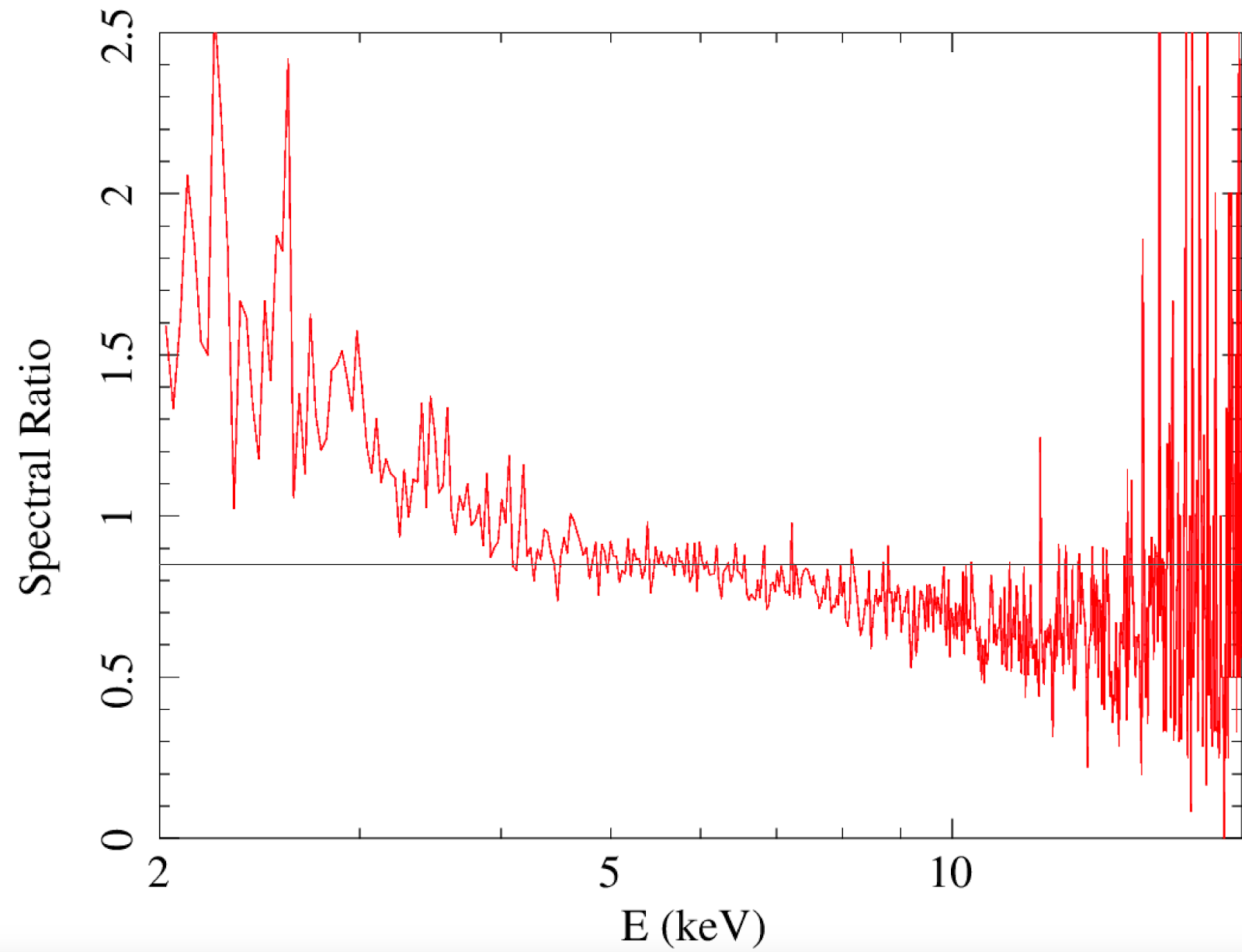
- Pixel-to-Pixel Spectral Differences. It has been found that in some sources (including point sources), there are broad and significant differences in spectra extracted from different Resolve pixels. The magnitude and energy dependence of the differences varies from source to source and from pixel to pixel, and is not dependent on count rate. The origin of these spectral differences is not yet understood, and is under investigation. The figure below shows the ratio of spectra from 31 pixels that exclude the central four, to the spectra from the central four, for two non-variable point sources. The left panel below shows a case for which the spectral ratio is flat (so any spectral differences are smaller than the statistical errors), and the right-hand panel shows a case for which the spectral ratio changes by as much as a factor of ~2.3 between 2 and 12 keV. Until the origin of the spectral differences is understood, they will have to be treated as systematic errors. If the photon statistics are sufficiently high, spectral differences may be observed between smaller groups of pixels, or even between individual pixels. At this time, it is not known how to determine which pixels or group of pixels yield spectra that are most faithful to the "true" spectrum. The pixel-to-pixel variation of the XMA effective area is insufficient to explain the observed spectral anomalies. Moreover, an XMA origin would impose similar spectral differences for all on-axis point-source observations, but this is found not to be the case. Extended sources present a greater challenge, because while it is possible to directly observe sub-array spectral differences in point-sources, for extended sources we cannot assume that the spectra in all pixels should intrinsically be essentially the same. This means that at this time it is not possible in general to gauge the severity of sub-array spectral distortion in extended sources, and this also complicates spatial-spectral mixing (SSM) analyses. In addition, it is possible that "jumps" in spectral parameters may occur between pixels that imply unphysical spatial variations.

- RSL-3: ARF (added before 2025-01-01)
- Resolve region file outputs from xamkregion should not be used as input regions to the ARF generator (xaarfgen or xaxmaarfgen) because the pixels in these region files are slightly rotated by different amounts relative to each other and some of the pixels overlap with each other. This is a design flaw inherited from Hitomi, based on mis-use of the XRISM ground calibration data and will be fixed in the future.
- Sub-array XMA effective area. rslmkrsp will result in a more accurate treatment of sub-array Resolve effective area than using rslmkrmf and xaarfgen to make separate RMFs and ARFs respectively. However, the smaller the size of the detector region, the more raytracing photons are needed when running rslmkrsp or xaarfgen. Note also that the calibration systematics for the XMA effective area for individual pixels can be very large, more than 50% in some cases (this is in addition to the pixel-to-pixel spectral differences in the data itself, mentioned in RSL-4). Therefore it is generally not recommended to do sub-array spectroscopy for spectra from fewer than 4 pixels.
- RSL-2: Energy scale assessment (added before 2025-01-01)
- Energy scale reports for all observations are available at https://heasarc.gsfc.nasa.gov/FTP/xrism/postlaunch/gainreports/. For any observation of interest, examination of the report for that OBSID is required in order to assure that the energy scale accuracy and spectral resolution are nominal and, therefore, standard Resolve data analysis techniques are applicable. If an energy scale report was not generated, it is likely that no (or insufficient) Fe55 calibration spectra for gain drift correction were acquired - as is the case for some early (check-out, commissioning) phase data and observations that experienced Filter Wheel Electronics anomalies. Each report includes a list of energy-report specific things to watch out for and caveats to attend to. If there are gain drift correction solution failures users may need to omit data in a specific pixel or pixels, in a specific time interval, or in a specific pixel or pixels over specific time interval (see version 3.2 or later of the Quick-Start Guide for details). If there are missing gain drift correction solutions, the impact depends on how its absence affects the gain history.
- There is a gain shift between Hp and Mp events, but one that is significantly mitigated by processing using HEASOFT 6.35 or later with XRISM CALDB 10 or later. Thus, reprocessing using xapipeline is required for archived observations processed with pipeline version earlier than 03.01.014.010 (2025-05-22). See version 3.2 of the Quick-Start Guide for details on handling of Mp events.
- Pixel 27 exhibits, as yet unexplained, gain excursions. Due to the relative infrequency of gain fiducial measurements, the calculated gain drift correction may not capture these excursions, rendering the Pixel 27 energy scale less reliable than for other pixels.
- Pixel 7 experienced an increase in broadband noise over a ~fifty-day interval estimated to extend from 2025-05-29 10:00 UTC (XRISM Mission Elapsed TIME = 202176000) to 2025-07-23 14:00 UTC (XRISM Mission Elapsed TIME = 206978000). This resulted in a degraded pixel 7 resolution (from ~4.5 eV to >7 eV and sometimes as high as 9 eV FWHM) for OBSIDs 201005010, 201099010, 201100010, 201090010, 201124010, 201113010, 201002010, 201092010, 201067010, 201094010, 201031010, 201081010, 201112010, 201086010, 201085010, 201058010 ,201042010, 201097010, 201078010. For these observations, events in this pixel ought to be completely omitted from analysis or, for the first and last of these observations, for part of the observation following the pixel partial-exposure procedures referred to in version 3.2 of the Quick-Start Guide.
Xtend
- XTD-5: Bad pixel image missing in some Xtend data processed May-July 2025 (added 2025-06-13)
- The pipeline processing briefly had an issue whereby the bad pixel image (‘outbadimg’ in xtdflagpix) is not produced. This file is a required input to xaexpmap, so without it users cannot create exposure maps or ARFs for Xtend data.
- Follow these instructions to see if your data is affected:
- The issue affects data processed with pipeline version 03.01.014.010 between 2025-05-22 and 2025-07-09 and downloaded from the archive around that time. The affected datasets were reprocessed shortly thereafter with a fixed pipeline. The pipeline version can be found in the PROCVER header keyword in the FITS event list. If the keyword value is something other than 03.01.014.010, then your data are unaffected by this bug.
- If you have reprocessed your Xtend data with xapipeline or xtdpipeline, the .bimg files should be present and you can skip the rest of the instructions.
- To be absolutely sure, look for the .bimg files. For each cleaned event list in <OBSID>/xtend/event_cl, for example:
- 000127000/xtend/event_cl/xa000127000xtd_p031100010_cl.evt.gz
- 000127000/xtend/event_cl/xa000127000xtd_p032000010_cl.evt.gz
- There should be a corresponding bad pixel image in <OBSID>/xtend/event_uf, for example:
- 000127000/xtend/event_uf/xa000127000xtd_p031100010.bimg.gz
- 000127000/xtend/event_uf/xa000127000xtd_p032000010.bimg.gz
- If the .bimg file(s) are missing, your data is affected and you will need to produce them by hand.
- Follow these instructions to create the .bimg file(s):
- cd 000127000/xtend/event_uf
- punlearn xtdflagpix
- xtdflagpix \
- infile=xa000127000xtd_p031100010_uf.evt \
- outfile=xtdflagpix_tmp.evt \
- outbadimg=xa000127000xtd_p031100010.bimg \
- hotpixfile=xa000127000xtd_a031100010.hpix \
- flickpixfile=NONE
- rm xtdflagpix_tmp.evt
- Replace instances of 000127000 with the OBSID for your observation.
- Replace the 031100010 with the relevant 8-character string from your event list name.
- Run this for each cleaned event list name, but use the unfiltered (‘uf’) event list as the input to xtdflagpix.
- Delete the output event list after running xtdflagpix, since you do not need it.
- When you run xaexpmap, set the ‘badimgfile’ parameter to the .bimg file you created here.
- XTD-4: Obscured portion of the field of view (added before 2025-01-01, updated 2026-02-11)
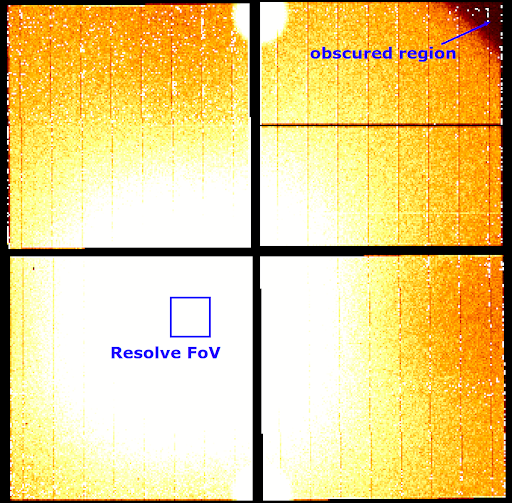
- The corner of the Xtend FoV farthest from the aimpoint is blocked by a structure of the camera. While there may be counts detected in this region, they are all from unfocused non-X-ray background and not from celestial X-rays. The approximate location of this region can be seen below in a DET-coordinate image of the sunlit limb of the Earth from the 'day Earth' trend archive.
- This DET coordinates region file is available in the HEASoft REFDATA directory under $LHEA_DATA/unobstructed_XTD_det.reg.
- XTD-2: Regions in 1/8 window mode (added before 2025-01-01)
- In 1/8 window mode, the region for input to the ARF generator must be confined to be completely inside the boundaries of the window, otherwise the ARF will not be correct. The image below in DET coordinates shows an example of a correct region.
Miscellaneous
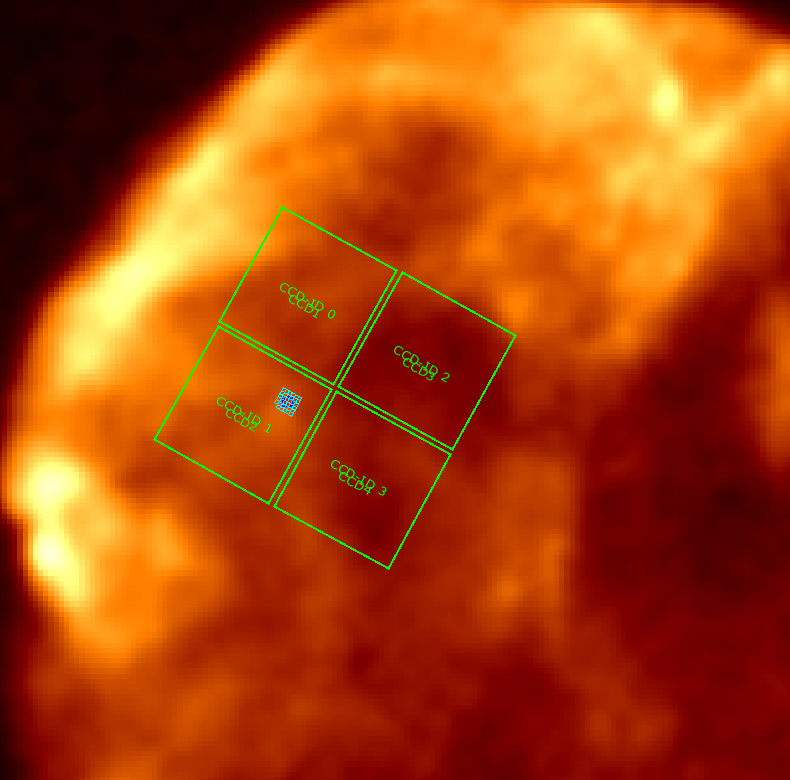
- MSC-1: The SDC has prepared ds9 'template' region files that include the XRISM instrument fields of view. These can be displayed on any image with WCS information, e.g. from ROSAT, Chandra, XMM, eROSITA, DSS, SDSS. These regions should be used only for display purposes, not for extracting products for analysis.
Deprecated
Items here are either no longer applicable for recent versions of HEASoft, or they have been superseded by information in other official XRISM sources, for example in the XRISM Data Reduction Guide or the Quick Start Guide. They are retained here for reference.
- RSL-1: Data format and naming conventions (added before 2025-01-01, retired 2026-02-11; information is now in the XRISM Data Reduction Guide)
- The event files (and the spectra extracted from them) are split according to the filter wheel setting:
- p0px0000 UNDEF
- p0px1000 OPEN
- p0px2000 Polyimide
- p0px3000 ND
- p0px4000 Be
- p0px5000 Fe55
- In general, you should use 'p0px1000' events for most science or calibration data analysis, unless the ND filter was used.
- XTD-1: Data format and naming conventions (added before 2025-01-01, retired 2026-02-11; information is now in the XRISM Data Reduction Guide)
- Xtend can have multiple input files split by the operating modes. The Xtend file naming convention is:
- xaNNNNNNNNNxtd_pRzdmcccca_cl.evt
- xa000127000xtd_p031100010_cl.evt (example 1)
- xa000127000xtd_p032000010_cl.evt (example 2)
- where:
- NNNNNNNNN = 9-digit OBSID
- p = 'p' for pointed observation, 's' for slew observation, 'a' for all (will usually be 'p')
- R = index for data divided into multiple files due to (e.g.) filesize. R is in the range [0-9a-zA- Z] and set to 0 if no division is needed.
- zdmccca = dataClass, which describes the CCDs used and their configuration, where:
- z = placeholder always set to 3 for Xtend in-flight data
- d = DETNAM: 0 = CCD, 1 = CCD12, 2 = CCD34
- m = DATAMODE: 0 = WINDOW1 (full window), 1 = WINDOW2 (1/8 window), 2 = WINDOW1BURST (full window + 0.1 sec burst mode), 3 = WINDOW2BURST (1/8 window + 0.1 sec burst mode)
- cccc = hexadecimal encoding of on-board instrument settings (thresholds, area discrimination, ADC chains used, readout nodes used, charge injection settings, etc.)
- a = reserved bit, 0 for now
- Some common dataClass values you may encounter:
- 30000010: the event list contains all four CCDs in full window mode
- 31100010: the event list contains CCD1 and CCD2 in 1/8 window mode
- 31300010: the event list contains CCD1 and CCD2 in 1/8 window + 0.1 sec burst mode
- 32000010: the event list contains CCD3 and CCD4 in full window
- The first three digits of this (300*, 311*, 313*, 320*) are the important ones that tell you the mode and the contents of the event list, whether it contains data from all CCDs or just a pair. You can also look at the DETNAM, DATAMODE, and DATACLAS header keywords.
- DATAMODE = WINDOW1BURST (full window + 0.1 sec burst mode) is not supported for science observations, only for Xtend IT usage.
- Pairs of CCDs share clock drivers, so CCD1+CCD2 always operate in the same mode, and CCD3+CCD4 always operate in the same mode.
- CCD2 is the aimpoint CCD, and only the CCD1+CCD2 pair is allowed to operate in 1/8 window or 1/8 window+0.1 sec burst mode; the CCD3+CCD4 pair always operates in full window mode.
- You should always see a 320* event list along with a 311* or 313* event list.
- You will generally only see a single 300* event list when all CCDs are in full window mode.
- XTD-3: Flickering pixels, cosmic-ray echo events, anomalous pixels (added before 2025-01-01, retired 2026-02-11; 'searchflickpix' is no longer used in the pipeline, and its usage in XRISM data analysis is discouraged. Instead, please use the 'xtdpixclip' tool described in Quick Start Guide version 3.2 or later.)
- It has been found that the tool searchflickpix, used for removing events from flickering pixels and cosmic-ray echo events does not work well with XRISM data in an automated setting, so it is not applied in the XRISM pipeline. This is because there is a risk that true source events might be removed. However, the pipeline still runs searchflickpix without applying it to the data, but produces the .fpix file that lists the flagged pixels. This file is used by xaexpmap (which then is used by xaarfgen). Therefore, the .fpix file from the pipeline should not be used as input to the xaexpmap. The user should follow the Quick-Start Guide on mitigation strategies for anomalous pixel removal, and either make their own .fpix file, or specify NONE as input to xaexpmap. Note the following corrections to the Quick-Start Quide v2.1:
- All of the searchflickpix commands should have the following parameter settings added:
- If you are directed to section 5 from step 3 in the Appendix (i.e., if you are applying a simple threshold cut), add the following parameter settings to both searchflickpix commands:
|